Duplicate Remover Wizard

While Act! allows you to find & manually merge two contacts at a time, this addon will save you hours of tedious work, clean up your database & reduce errors, by merging all duplicate contacts & companies in bulk.

Removes duplicate Contacts & Companies

  • Process all contacts in your database or just the contacts in a specific group; or process all companies.
  • Specify up to 6 fields to be used to match records to find duplicates (5 for companies).
  • Specify whether records where one or more of the match fields are blank are to be ignored (recommended).
  • Specify whether the most or least recently created/modified record is the record that will be retained in full.
  • Selectively exclude records from the potential matches found by the program.
  • Merge fields from records to be deleted into blank fields in the record that will be retained.
  • If a non-blank field that is different than the value that is being kept is present in some field in a record to be deleted, record that field name & value to a note.
  • Move all subsidiary data (Notes, History, Activities, Opportunities, Documents & Custom Table entries) to the retained contact/company.
  • For merged contacts, retain Secondary Contacts, Company Links & Company/Group static membership.
  • For merged companies, retain Contact Links & static Contact/Opportunity membership; and retain the dynamic criteria from one of the company records being combined.
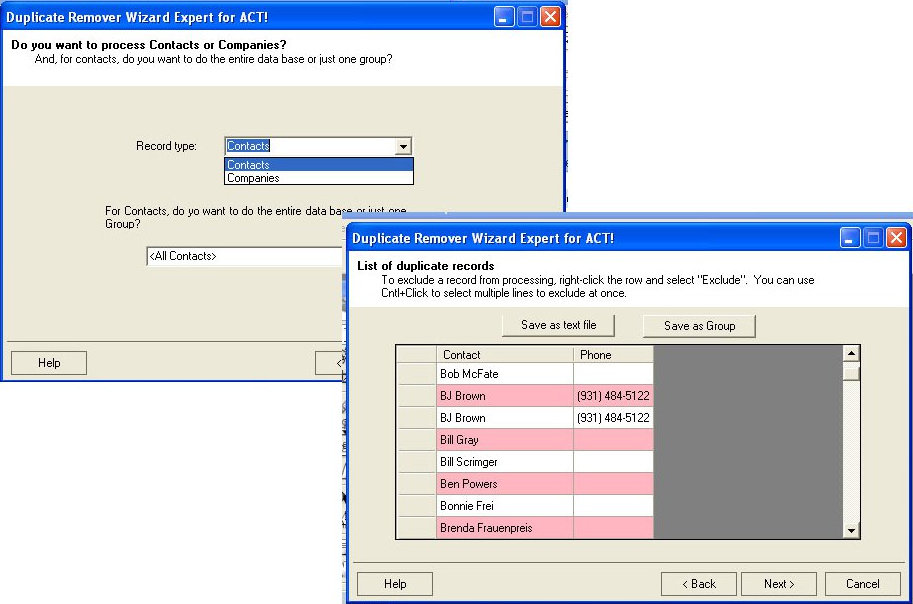
duperemoverexpertscreenshots.jpg

$235AUD
BUY AUD
$259NZD
BUY NZD

per year (GST added at checkout for AU/NZ customers). To be installed on a single computer only (usually the database server).
This is for Act! v24-25. Please note that upgrading Act! may require the purchase of a new version of this add-on.
We recommend purchasing a support session to assist with first use for the best outcome (available at checkout).
Also available for Act! v19-23: download here | purchase here

28-Day Guided Trial

Set Up Properly, Decide with Confidence

The 28-day extended trial is designed for businesses that want to experience Act! Advantage working inside their business, not just explore features.

To access the extended trial, you’ll book an initial session with an Act Today consultant based in Australia or New Zealand. During this session, we’ll help you set up three key CRM functions that matter most to your business, such as client follow-ups, communication workflows, retention tracking, or referral visibility.

At the 14-day mark, you’ll have a second check-in with your consultant to answer questions, refine your setup, and remove any roadblocks. This ensures you’re not left guessing and that the system is actually supporting your work.

By the end of the 28 days, you’ll know exactly how Act! Advantage fits your business and whether it delivers real value.

What you’ll get from the 28-day extended trial:

  • Guided setup by a local Act Today CRM consultant
  • Three high-impact CRM functions configured for your business
  • A mid-trial review to answer questions and fine-tune usage
  • A realistic view of outcomes, not just features
  • Confidence to decide based on real experience
START YOUR EXTENDED TRIAL

14-Day Free Trial

Get Hands-On with Act! Advantage CRM

The 14-day free trial gives you full access to Act! Advantage CRM so you can explore how it works in your own time. This is the standard Act! trial used by businesses across Australia and New Zealand who want to see the platform before making a decision.

During the trial, you can add contacts, explore client records, test communication tools, and see how Act! Advantage handles day-to-day client management. It’s a straightforward way to understand how the system is structured and whether it feels right for how you run your business.

This option suits businesses that are comfortable exploring software independently and already have a clear idea of what they want from a CRM. There’s no obligation, no setup required, and no pressure,  just time to assess fit.

What you’ll get from the 14-day free trial:

  • Full access to Act! Advantage CRM features
  • A clear look at how contacts, activities, and communication are managed
  • The ability to test the system across desktop and mobile
  • A simple, no-commitment way to assess fit
  • Confidence before taking the next step
START YOUR TRIAL

Download the FREE Guide

How to Choose the Best CRM for Your Business